Here's a failure mode every developer using an AI assistant has hit: you ask it to integrate with an API, and it confidently writes code against endpoints that don't exist. Not because the model is bad, because it's working from training data and a guess, not from your actual docs.
The fix isn't a better prompt. It's giving the agent a way to read the docs, on demand, while it works.
That's what every Code Summary doc site already is: not just a website for humans, but an MCP server for agents. Same content, two front doors.
What MCP is, briefly
MCP, the Model Context Protocol, is a standard way for AI agents to call external tools and data sources. An MCP-capable client (Claude Code, Claude Desktop, Cursor, and a growing list of others) can connect to a server and use whatever it exposes.
When you publish docs with Code Summary, you get an MCP endpoint for that product or repo. No server to run, no package to install. It's a URL.
What it exposes
The endpoint isn't a dumb file dump. It gives an agent real tools:
- list_docs: every published doc with its path and size, so the agent knows what's available before it reads anything
- read_doc: the full content of a specific page, by path
- search_docs: find the pages relevant to what the agent is actually doing
- get_metadata: what this product is, its live version, when it last published
The agent decides what it needs and pulls only that. It's reading your published docs, the version you chose to ship, not a draft, not a stale snapshot someone pasted into a context file six months ago.
The MCP endpoint always serves the currently-published version. Roll back a version in the dashboard and every connected agent is reading the rolled-back docs on its next call. There is no copy to keep in sync because there is no copy.
Connecting an agent
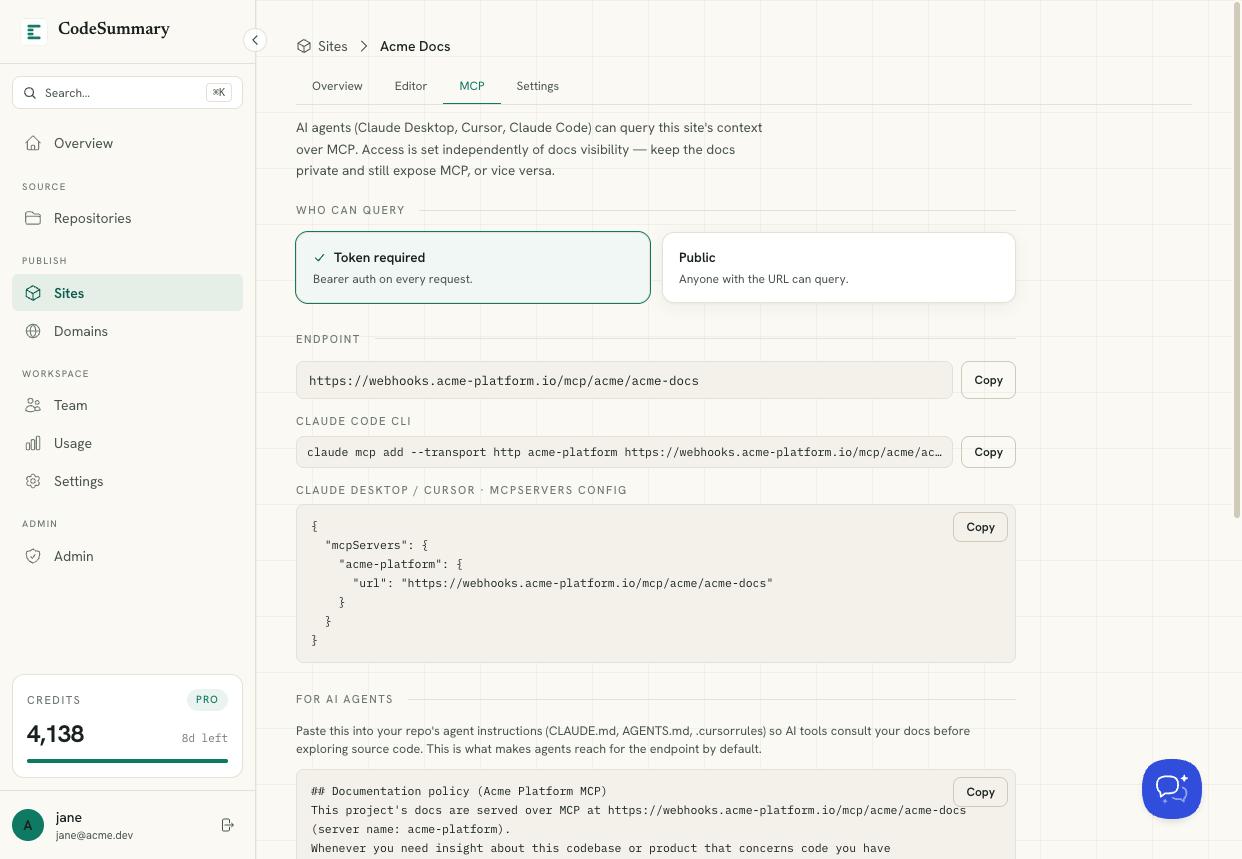
Point your client at the endpoint. In Claude Code that's one command; in Claude Desktop or Cursor it's a few lines in the MCP servers config. The dashboard shows you the exact snippet for each, with your endpoint already filled in, copy, paste, done.
From then on, when you ask your assistant to do something involving the documented system, it can look it up instead of inventing it. The hallucinated endpoint problem goes away because the real endpoint is one tool call away.
Public, or locked down
Not every doc set should be open to the world, and the MCP endpoint respects that.
If a product is public, its MCP endpoint is open, anyone can point an agent at it. Good for open-source projects and public APIs where the whole point is reach.
If it's private, the endpoint requires a bearer token. You mint tokens in the dashboard, scope them, name them, and revoke them. An agent without a valid token gets a clean 401, the docs stay private, the endpoint stays usable by the people you've authorized. The plaintext token is shown exactly once, hashed at rest, and a revoke takes effect immediately.
On your own domain
By default the endpoint lives on the shared Code Summary domain. On a paid plan you can put it on a domain you own, alongside the docs site itself.
So your customers get docs.yourcompany.com to read, and their coding agents get docs.yourcompany.com/mcp to query, same hostname, automatic SSL, your brand the whole way through. From the outside it looks like infrastructure you built. It's a URL you configured.
Why this matters more than it sounds
Documentation has always had a distribution problem with AI tools. You write good docs, and the agent still can't see them, so developers paste fragments into context files that immediately go stale. Everyone's working from a photocopy of a photocopy.
An MCP endpoint closes that loop. The docs are generated from the code, published when you approve them, and read live by the agent. The human path and the agent path never diverge because they're the same docs.
You don't maintain a separate "for AI" version. You publish once. Both audiences get the current truth.
Start
If you already publish docs with Code Summary, the MCP endpoint is already there, check the MCP tab on any product. If you don't yet, publishing your first doc site is free, and the endpoint comes with it.